Snowflake vs. BigQuery in 2026: A CTO's Guide to Cost-Performance Optimization
Snowflake and BigQuery are both capable at scale, but capability is not the differentiator in 2026. Cost governance is. This post breaks down the compute and storage economics of both platforms and gives CTOs the specific clustering, partitioning, and SQL optimization techniques that actually move the needle on warehouse spend.

Cloud data warehouse bills have a way of catching executives off guard. A platform that costs $80,000 annually at 50 GB of data can balloon past $600,000 once a company hits serious scale, and the culprit is seldom the data volume itself. According to Flexera's 2025 State of the Cloud Report, 32 percent of cloud spend is wasted due to misconfigured resources and inefficient query patterns, and data warehouses are one of the biggest contributors to that number. If you are running Snowflake or BigQuery at scale, this post is a practitioner's guide to understanding why your bill looks the way it does and what to actually do about it.
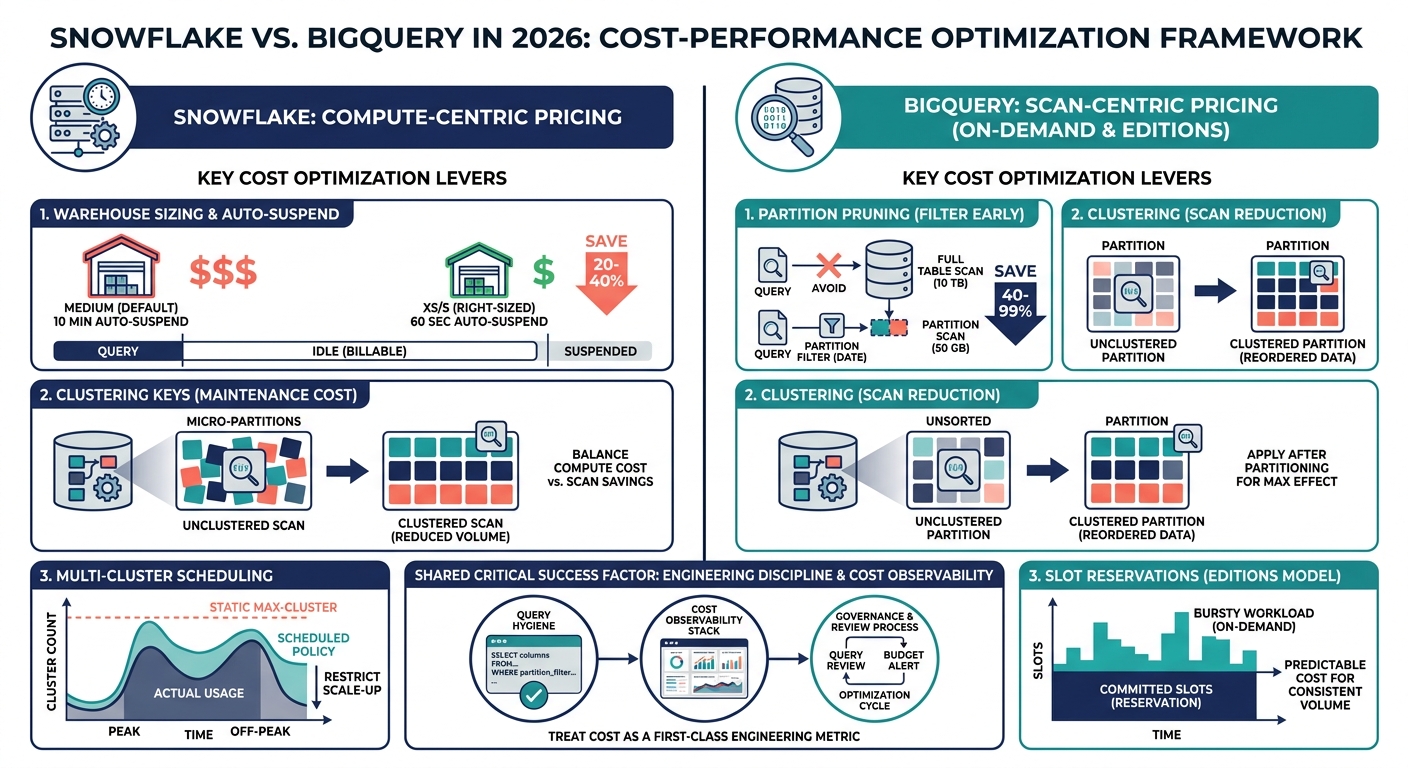
1. Snowflake costs are controlled by warehouse sizing and auto-suspend Compute and storage are billed separately understanding virtual warehouse behavior is the fastest way to cut spend by 20–40%.
2. In BigQuery, bad SQL is a direct tax on your budget On-demand pricing charges per byte scanned, making partition filters and clustering keys the most impactful optimization levers available.
3. Most teams leave cache hit rates well below their potential Non-deterministic query construction keeps cache utilization under 30% parameterized queries and consistent aliasing can push it past 60% with minimal effort.
4. Snowflake multi-cluster warehouses are frequently misconfigured Running max-cluster settings at all hours instead of peak windows only is one of the most common causes of avoidable enterprise compute costs.
5. Partitioning and clustering must be applied in sequence, not interchangeably Partitioning eliminates entire data ranges from scans, while clustering reorders within partitions both techniques are needed together for maximum effect.
The Big Picture
The conversation between Snowflake and BigQuery has shifted considerably over the past two years. It used to be a conversation about features and SQL compatibility. In 2026, the conversation is almost entirely about economics. Both platforms are capable. Both handle petabyte-scale workloads. Both support semi-structured data, real-time ingestion patterns, and solid BI integrations. The differentiator for most scaling companies is no longer what the platform can do. It is what the platform costs you when your engineers are not paying close attention. Snowflake's pricing architecture is fundamentally compute-centric. You pay for virtual warehouses by the second, and storage is billed separately at around $23 per terabyte per month on standard tiers. That separation sounds appealing on paper because you can scale compute without touching storage costs. In practice, it creates a management burden. Warehouses that are not properly suspended, queries that spill to disk because warehouse sizes are too small, and multi-cluster configurations that spin up aggressively are all budget drains that require active governance to contain. Snowflake gives you control, but control requires discipline. BigQuery operates on a fundamentally different model. Google charges you for the bytes your queries touch, not the time a compute cluster is running. That model has obvious appeal for intermittent or unpredictable workloads because you are not paying for idle capacity. But it punishes teams that write lazy SQL. A `SELECT *` against a 10 TB table is not a question of performance. It is a direct line item on your invoice. The shift to BigQuery Editions has added slot-based purchasing as a serious alternative, and for companies with consistent, high-volume workloads, reservations are now delivering significantly better cost predictability than on-demand ever could.
What's Delivering Measurable Impact
Snowflake Warehouse Right-Sizing and Auto-Suspend Policies
The default Snowflake configuration that most teams ship with is a Medium warehouse with auto-suspend set to 10 minutes. That is almost never the right configuration. For most analytical workloads, an XS or S warehouse with a 60-second auto-suspend handles the query volume just fine, and the cost difference between a Medium and an XS warehouse is a factor of eight. Right-sizing means profiling your actual query queue depth and execution times, then sizing down until you find the smallest warehouse that keeps queue wait times acceptable. You will almost always find you over-provisioned.
BigQuery Partition Pruning as a Cost Control Mechanism
BigQuery's billing engine counts bytes scanned before any filters are applied at the application layer. That means filtering inside a subquery or a CTE after a full table scan does not save you money. The filter has to exist as a partition filter at the top-level query to trigger pruning. Teams that implement date-based partitioning on their fact tables and enforce partition filters through query governance policies see immediate, measurable cost reduction. Google's own documentation confirms that partitioned tables can reduce query costs by 40 to 99 percent depending on query selectivity, and that range reflects how dramatically query patterns vary.
Clustering Keys in Snowflake and Their Maintenance Overhead
Snowflake clustering is one of the most misunderstood features in the platform. Clustering reorders micro-partitions on disk to reduce the number of partitions scanned during queries. When done correctly on a large, frequently queried table, it can cut query scan volume by 60 to 80 percent. The catch is that automatic clustering has a recurring compute cost, and that cost needs to be weighed against the query savings. The right approach is to profile your query filter patterns first, identify columns that appear in WHERE clauses or JOIN conditions on tables above 50 GB, and then evaluate whether the clustering credit spend justifies the scan reduction.
BigQuery Slot Reservations and the Editions Model
The shift to BigQuery Editions has made slot economics more accessible and more nuanced at the same time. Standard Edition slots are available at roughly $0.04 per slot-hour on pay-as-you-go, and committed reservations can bring that down by 25 to 50 percent depending on commitment duration. The practical decision comes down to workload consistency. If your team has predictable daily query volumes and your slot utilization stays above 60 percent during business hours, reservations almost always win on cost. If your workload is genuinely bursty and unpredictable, on-demand retains an edge. The worst outcome is buying reservations without understanding your actual slot consumption patterns, which results in paying for idle slots instead of idle virtual warehouses.
Writing Efficient SQL to Stop Scan Bleed
On both platforms, the single most scalable cost control mechanism is query hygiene, and it is also the most consistently ignored. On BigQuery, avoid SELECT *, always specify columns, and ensure that aggregations happen on filtered subsets rather than full table scans. On Snowflake, avoid result set fetches that bypass the result cache by introducing non-deterministic functions like CURRENT_TIMESTAMP() in positions that affect cache keys. Use QUALIFY instead of nested subqueries for window function filters. Profile query plans regularly using EXPLAIN outputs and query history tables, and build a short review cycle into your data engineering workflow for any query that scans more than 1 TB.
What's Still Overpromised
Snowflake's Search Optimization Service
Snowflake's Search Optimization Service promises to accelerate point lookup queries on large tables without manual clustering. The pitch is appealing, especially for teams without the engineering bandwidth to manage cluster keys. The reality is more complicated. The service adds a storage overhead cost on top of query savings, and for workloads that are primarily aggregation-heavy rather than point-lookup-heavy, the cost-to-benefit ratio is poor. It works well for specific use cases like customer-level queries on billion-row tables, but it is not a general-purpose optimization and should not be treated as one.
BigQuery BI Engine for Dashboard Acceleration
BigQuery BI Engine can cache query results in memory and dramatically reduce latency for connected BI tools like Looker. The promise is sub-second dashboard loads at low cost. In practice, BI Engine reservations are scoped at the project level and do not always align well with multi-team or multi-project architectures. Teams that buy BI Engine capacity expecting broad acceleration often find that only a fraction of their dashboard queries are actually eligible for in-memory caching, particularly if those queries use dynamic filters or user-level row-level security policies.
Cross-Cloud and Multi-Cloud Data Sharing
Both platforms have made significant marketing investments around cross-cloud data sharing. Snowflake's Marketplace and Data Clean Rooms, and BigQuery's Analytics Hub, are genuinely useful in specific enterprise scenarios. But the framing that you can run a seamless multi-cloud data strategy across AWS, Azure, and GCP with either platform understates the egress costs, the latency penalties, and the governance complexity involved. For most companies, cross-cloud sharing works best when it is scoped to a specific, well-defined data product exchange rather than used as a general architectural pattern.
Implementation Framework
Where to Start
Before you touch a single configuration setting, pull 90 days of query history from your platform's metadata layer. On Snowflake, that means querying QUERY_HISTORY and WAREHOUSE_METERING_HISTORY in the ACCOUNT_USAGE schema. On BigQuery, that means examining INFORMATION_SCHEMA.JOBS_BY_PROJECT with cost estimates derived from bytes processed and your effective per-TB rate. Your goal is to rank queries by total compute cost, not by frequency or duration alone. The 80/20 principle holds almost universally here: a small number of queries and a small number of tables will account for the vast majority of your spend, and that is exactly where your optimization effort should concentrate first.
Where Most Teams Go Wrong
The most common failure mode is implementing optimizations in isolation without validating the downstream effect on query performance. A team that aggressively reduces warehouse sizes to cut costs without monitoring queue wait time will degrade analyst productivity and erode trust in the data platform faster than any cost savings can justify. Similarly, adding clustering keys in Snowflake or partitioning schemes in BigQuery without updating the queries that touch those tables means the optimization never fires. Cost optimization on these platforms is a joint effort between infrastructure and query authoring, and teams that treat it purely as a configuration exercise almost always leave significant savings on the table.
Critical Success Factor
The Road Ahead
Both Snowflake and BigQuery are investing heavily in AI-assisted query optimization and automated workload management. Snowflake's Cortex-integrated query advisor capabilities and BigQuery's Gemini-assisted SQL suggestions are early signals of where the platforms are heading: a model where the warehouse actively recommends configuration changes rather than waiting for a consultant to find the waste. These features are still maturing, but the trajectory is clear. Autonomous cost governance will eventually close some of the gaps that currently require manual engineering oversight, particularly around warehouse sizing and partition strategy recommendations. For CTOs navigating this decision today, the platform choice is less important than the operational discipline you build around whichever platform you select. The cost curves on both are manageable with the right practices in place. The companies that overpay are not choosing the wrong platform. They are choosing a platform and then treating it as a black box. If you want to build the governance layer, the query review processes, and the cost attribution frameworks that keep your data warehouse bill predictable at scale, the team at Alfa Analytics has done this work across dozens of organizations. Book a consultation, and we will start with your actual query history, not a generic checklist.
Written by Ali Raza
Founder & CEO at Alfa Analytics
Business-first Data Strategist and AI Consultant who transforms raw information into high-impact growth engines. Expert in advanced analytics ecosystems, predictive modeling, and executive BI dashboards ensuring every data initiative directly drives revenue, efficiency, and strategic clarity.
Ready to transform your data into results?
Our team has delivered 400+ analytics projects across 18 industries. Book a free 30-minute consultation to discuss how we can help.
More from Alfa Analytics
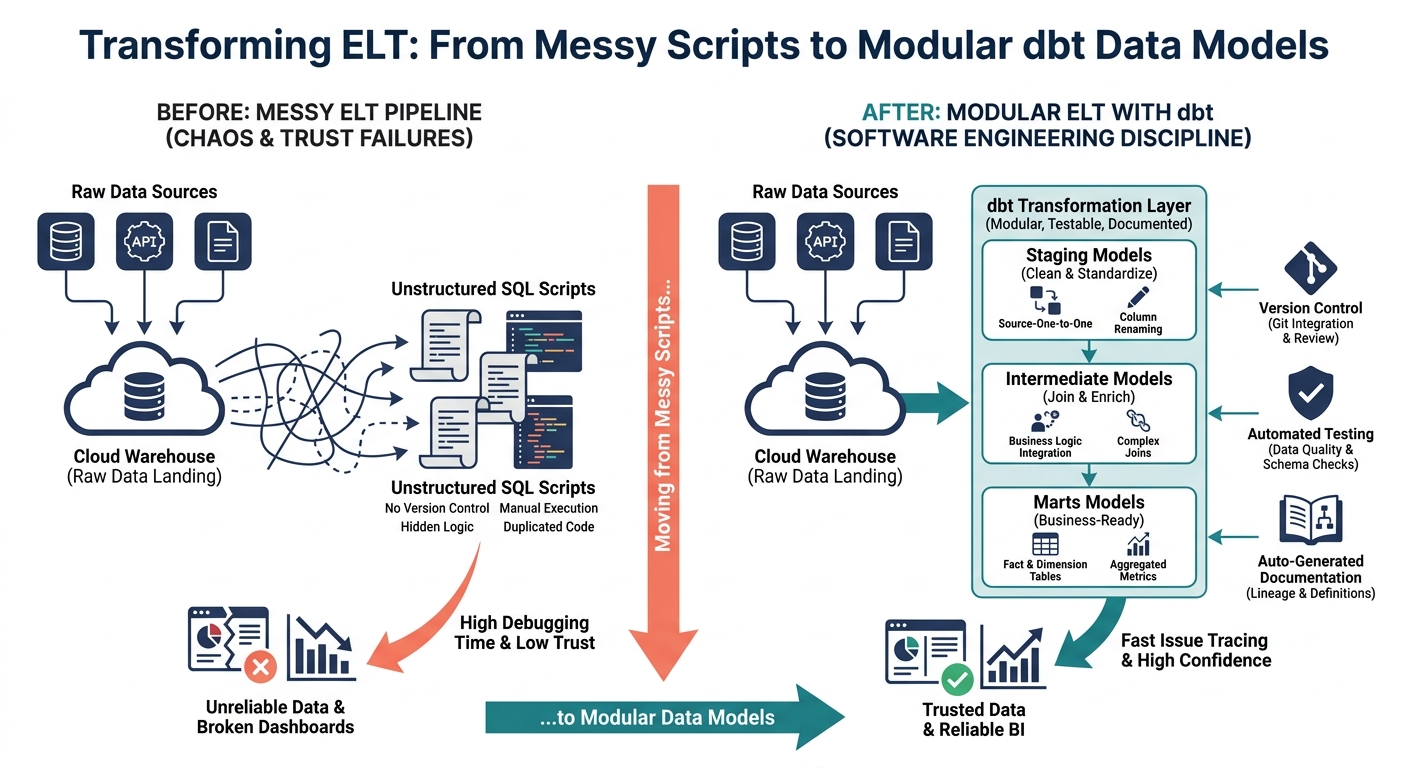
Why Your ELT Pipeline Needs dbt: Moving from Messy Scripts to Modular Data Models
Messy SQL scripts and undocumented transformation logic are among the leading causes of data trust failures in modern analytics teams. This post explains how dbt brings software engineering discipline to your ELT pipeline and what it actually takes to build a modular, testable, and documented transformation layer that your BI tools can rely on.

How to Build a Modern Data Pipeline in 2026
The global data pipeline market is projected to reach $43.61 billion by 2032. This architect's guide covers the production-grade ELT patterns, tooling decisions, and governance frameworks that separate high-performing pipelines from expensive failures.